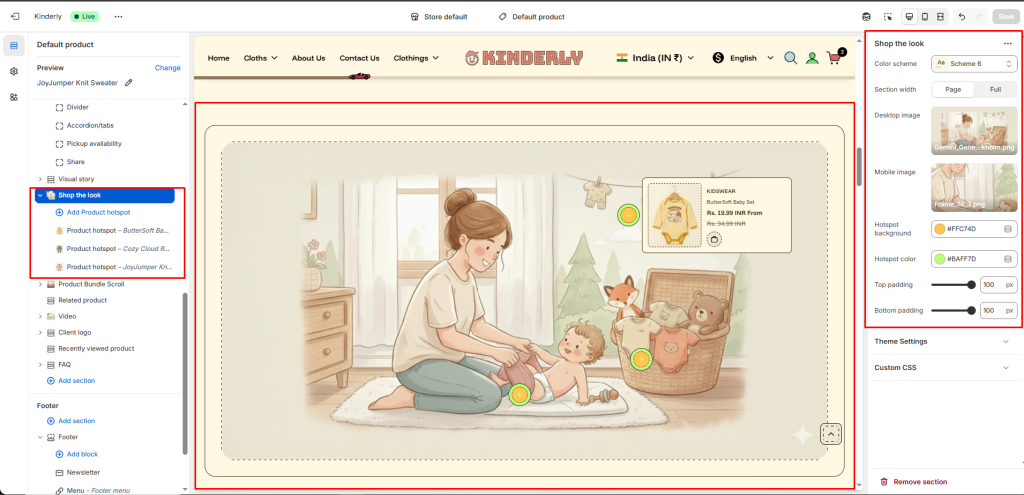
The Shop the Look section displays a lifestyle image with clickable product hotspots. When a hotspot is clicked, a product card popup appears — letting shoppers discover and buy featured products directly from the image.
Color Scheme #
Choose a predefined color style from your theme’s color options.
Section Width #
Controls the layout width. Options: Page, Full.
Desktop Image #
Upload the lifestyle image displayed on desktop.
Mobile Image #
Upload a separate image optimized for mobile.
Hotspot Background #
Sets the background color of the hotspot dot.
Hotspot Color #
Sets the icon/pulse color of the hotspot dot.
Top Padding #
Sets vertical space above the section. Value in pixels.
Bottom Padding #
Sets vertical space below the section. Value in pixels.
Product Hotspot Block #
Each block places one product hotspot on the image. Click a block to configure:
Product #
Link a Shopify product to this hotspot. The product image, title, and price will appear in the popup card when the hotspot is clicked.