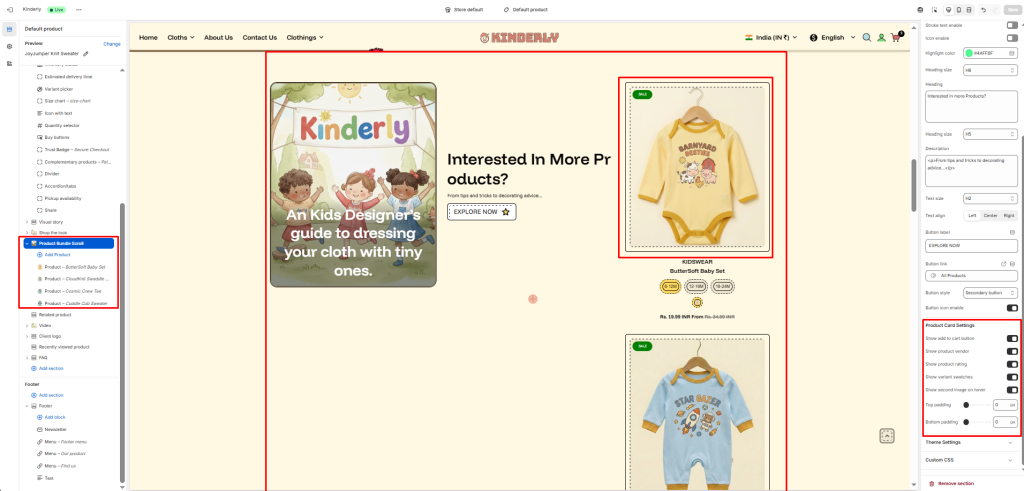
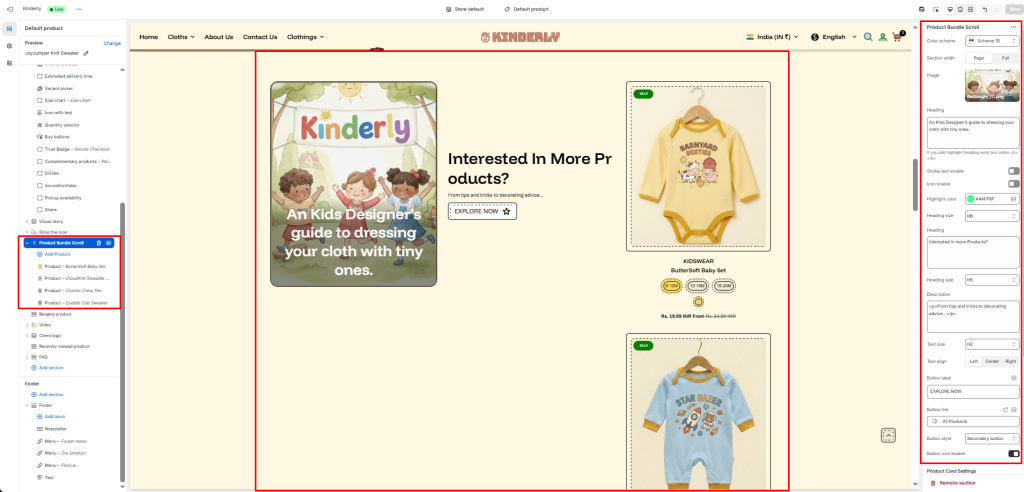
The Product Bundle Scroll section displays a two-column layout with a promotional content panel on the left and a vertically scrolling list of product cards on the right — great for upselling or cross-selling related products.
Color Scheme #
Choose a predefined color style from your theme’s color options.
Section Width #
Controls the layout width. Options: Page, Full.
Image #
Upload a background or promotional image for the left content panel.
Heading (Image Overlay) #
Text displayed over the image on the left panel. Supports highlight text using <b> tag.
Stroke Text Enable #
Toggle to apply a stroke/outline effect on the image heading. (Toggle)
Icon Enable #
Toggle to show a decorative icon next to the image heading. (Toggle)
Highlight Color #
Pick the color used for the highlighted part of the image heading.
Heading Size (Image) #
Select the heading tag size for the image overlay text.
Heading #
The main title shown in the center content area.
Heading Size #
Select the heading tag size for the center heading.
Description #
Supporting paragraph text below the center heading.
Text Size #
Adjusts the font size of the description.
Text Align #
Aligns the center content. Options: Left, Center, Right.
Button Label #
Text shown on the call-to-action button.
Button Link #
The URL the button navigates to.
Button Style #
Select a predefined button style. Default: Secondary button.
Options:
- Primary button
- Secondary button
Button Icon Enable #
Toggle to show an icon inside the button. (Toggle)
Product Card Settings #
Show Add to Cart Button #
Toggle to display an add to cart button on product cards. (Toggle)
Show Product Vendor #
Toggle to show the vendor name on product cards. (Toggle)
Show Product Rating #
Toggle to display the star rating on product cards. (Toggle)
Show Variant Swatches #
Toggle to show color/size variant swatches on product cards. (Toggle)
Show Second Image on Hover #
Toggle to display the product’s second image on hover. (Toggle)
Top Padding #
Sets vertical space above the section. Value in pixels.
Bottom Padding #
Sets vertical space below the section. Value in pixels.
Product Block #
Each block adds one product to the scrolling list on the right. Add blocks via + Add Product.