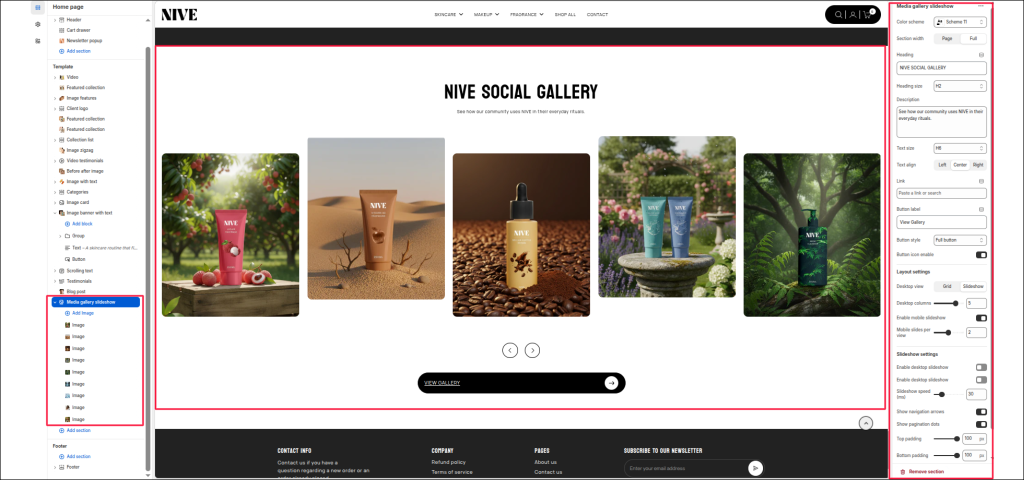
The Media gallery slideshow section is designed to showcase your brand’s social media presence directly on your store, helping to strengthen engagement and brand storytelling. This section displays a customizable grid or slider of images that mimic your Instagram posts, encouraging visitors to follow your brand and explore more content.
Section Settings #
Color scheme #
Select a predefined color palette to match your theme’s aesthetic.
Section width #
Choose between Page (contained layout) or Full (edge-to-edge layout).
Heading #
Add a section title (e.g., NIVE ON THE GRAM) to introduce your Instagram showcase.
Heading size #
Choose the appropriate heading tag (H1–H6) to fit your design hierarchy.
Description #
Optionally add a short text description to provide context or encourage visitors to follow your Instagram.
Text size #
Control the font size for the description text.
Text align #
Align your heading and description text to Left, Center, or Right.
Link #
Add your Instagram page link so visitors can easily access your profile.
Button label #
Define the button text (e.g., Instagram) displayed below the heading.
Layout settings #
Desktop view #
Choose between Grid or Slider layout for desktop devices.
Desktop columns #
Set the number of columns to display on desktop (commonly 3–5).
Enable mobile slider #
Toggle this option to activate a swipeable slider on mobile devices.
Mobile slides per view #
Set how many images should be visible per slide on mobile.
Slider Settings #
Enable desktop slider #
Enable or disable the slider functionality on desktop view.
Slider speed (ms) #
Define the transition speed between slides (in milliseconds).
Show navigation arrows #
Display arrow controls for easy manual navigation.
Show pagination dots #
Display small dots below the slider to indicate the current slide.
Top padding / Bottom padding #
Adjust vertical spacing above and below the section for consistent layout spacing.
Blocks Settings #
Each block represents an individual Instagram post image.
Image #
- Upload or select an image to display within the feed.
- You can add multiple image blocks to create a visually rich gallery.