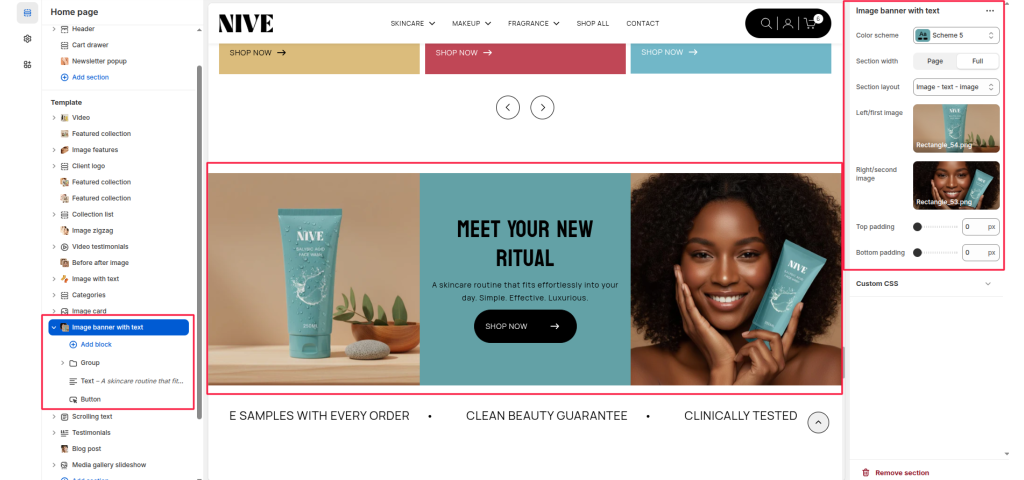
Image banner with text #
This section displays one image → text → second image (or any chosen layout) inside a banner.
Useful for category highlights, promotions, featured routines, etc.
SECTION SETTINGS #
Color scheme #
Choose the color scheme for the background and text.
Section width #
- Page – content stays inside page container
- Full – content stretches full width of screen
Section layout #
Controls the order of images and text. Available layouts:
- Image – text – image
- Image – image – text
- Text – image – image
- Image – text
- Text – image
- Image
- Text
- Image – image
Left/first image #
Upload the left-side image (or first image depending on layout).
Right/second image #
Upload the right-side image (or second image depending on layout).
Top padding #
Add spacing above the banner (0–200px).
Bottom padding #
Add spacing below the banner (0–200px).
Top Padding / Bottom Padding #
Adjust the spacing above and below the section in pixels for precise alignment with surrounding content.
Blocks Settings #
You can enhance your image banner with text by adding multiple content blocks, allowing you to create a more engaging and visually compelling combination of images and text.