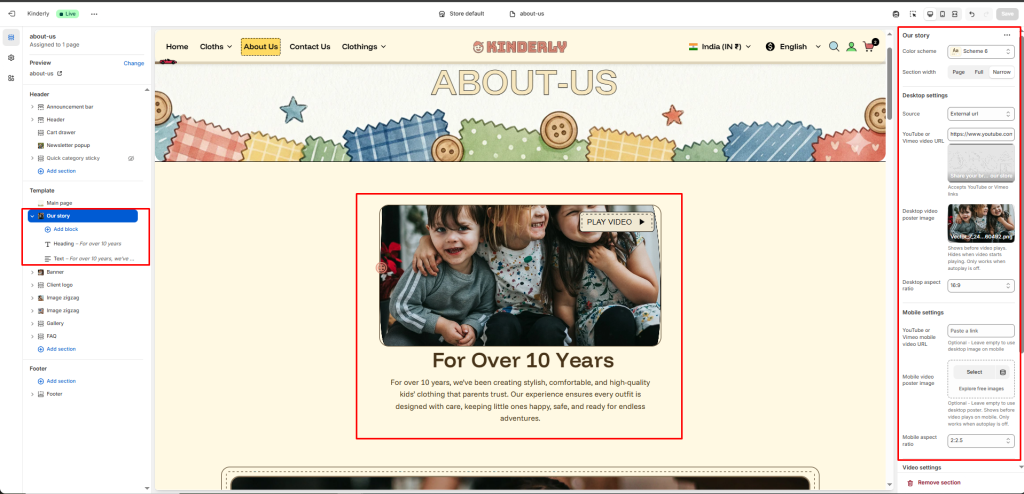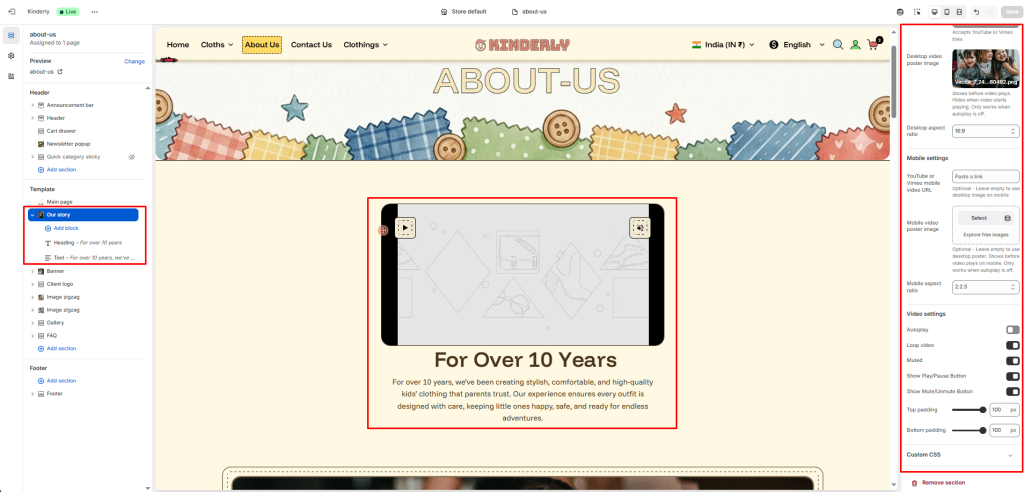
The Our Story section displays a video with a heading and text below it, designed for brand storytelling on pages like About Us.
Color Scheme #
Choose a predefined color style from your theme’s color options.
Section Width #
Controls the layout width. Options: Page, Full, Narrow.
Desktop Settings #
Source #
Select the video source type.
Options:
- External URL
- Uploaded
- Image
YouTube or Vimeo Video URL #
Paste the YouTube or Vimeo video link for desktop.
Desktop Video Poster Image #
Upload a cover image shown before the video plays. Hides automatically when the video starts. Only works when autoplay is off.
Desktop Aspect Ratio #
Sets the video aspect ratio on desktop.
Mobile Settings #
YouTube or Vimeo Mobile Video URL #
Paste a separate video link for mobile. Leave empty to use the desktop video automatically.
Mobile Video Poster Image #
Upload an optional cover image for mobile. Leave empty to use the desktop poster. Only works when autoplay is off.
Mobile Aspect Ratio #
Sets the video aspect ratio on mobile.
Video Settings #
Autoplay #
Toggle to play the video automatically on page load. (Toggle)
Loop Video #
Toggle to replay the video continuously. (Toggle)
Muted #
Toggle to mute the video by default. (Toggle)
Show Play/Pause Button #
Toggle to display the play/pause control button. (Toggle)
Show Mute/Unmute Button #
Toggle to display the mute/unmute control button. (Toggle)
Top Padding #
Sets vertical space above the section. Value in pixels.
Bottom Padding #
Sets vertical space below the section. Value in pixels.